跳转至

IO编程

Java中,按照流的数据流向,可以氛围输入流和输出流。按照流处理数据的单位,可以将其区分为字节流和字符流。

1.字节输入流

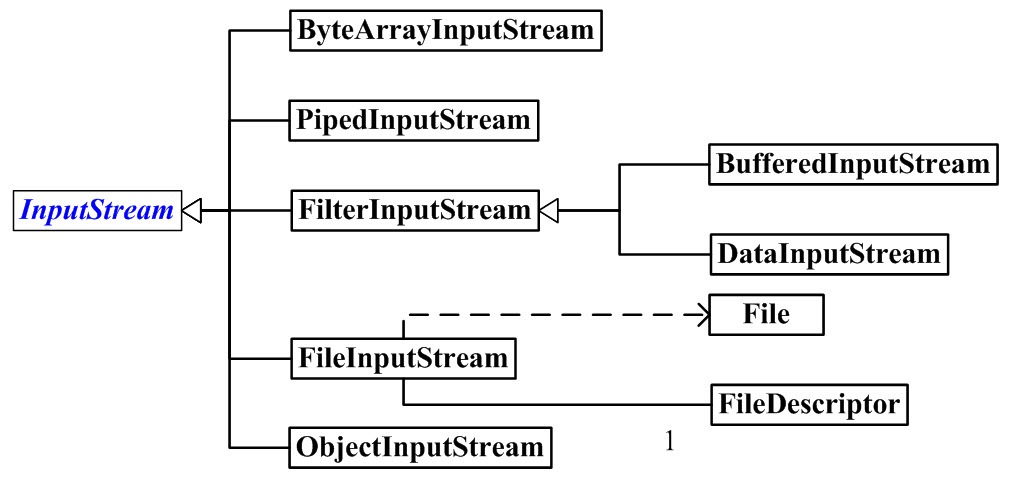
字节输入流框架图

1.1InputStream

InputStream是字节输入流的基类。

1.2ByteArrayInputStream

构造函数

  • ByteArrayInputStream\(byte\[\] buf\)
  • ByteArrayInputStream\(byte\[\] buf, int offset, int length\)

方法

  • int read()
  • int read\(byte\[\] b, int off, int len\)
  • long skip\(long n\)跳过n个字节
    private static final int LEN = 5;
    // 对应英文字母“abcdefghijklmnopqrsttuvwxyz”
    private static final byte[] letters = {
            0x61, 0x62, 0x63, 0x64, 0x65, 0x66, 0x67, 0x68, 0x69, 0x6A, 0x6B, 0x6C, 0x6D, 0x6E, 0x6F,
            0x70, 0x71, 0x72, 0x73, 0x74, 0x75, 0x76, 0x77, 0x78, 0x79, 0x7A
    };

    public static void main(String[] args) throws IOException {
        ByteArrayInputStream bais = new ByteArrayInputStream(letters);
        byte[] bytes = new byte[5];
        int hasRead;

        while ((hasRead=bais.read(bytes))!=-1){
            System.out.println(new String(bytes,0,hasRead));
        }
    }
//fghij
//klmno
//pqrst
//uvwxy
//

1.3FileInputStream

构造函数

  • FileInputStream\(File file\)
  • FileInputStream\(String name\)
  • FileInputStream\(FileDescriptor fdObj\)

方法

  • int read()
  • int read\(byte\[\] b\):从输入流中读取最多b.length个字节的数据,并将其存储在字节数组中,返回实际读取的字节数。
  • int read\(byte\[\] b,int off,int len\):从输入刘中读取最多len个字节数据,存入数组中。并不是从数组起点开始,而是从offset位置开始,返回实际读取的字节数。
FileInputStream fis = null;
        try {
            fis = new FileInputStream("/Users/malinkang/Downloads/test.md");
            byte[] buf = new byte[1024];
            int hasRead = 0;
            while ((hasRead = fis.read(buf)) > 0) {// 返回-1读取完成
                System.out.println(new String(buf, 0, hasRead));
            }
        } catch (IOException e) {
            e.printStackTrace();
        } finally {
            try {
                fis.close();
            } catch (IOException e) {
                e.printStackTrace();
            }
        }

1.4BufferedInputStream

BufferedInputStream 的作用是为另一个输入流添加一些功能,例如,提供“缓冲功能”以及支持“mark()标记”和“reset()重置方法”。

 BufferedInputStream bis = null;
        try {
            bis = new BufferedInputStream(new FileInputStream("/Users/malinkang/Desktop/test.md"));
            byte[] bytes = new byte[1024];
            int hasRead = 0;
            while((hasRead=bis.read(bytes))!=-1){
                System.out.println(new String(bytes,0,hasRead));
            }
        } catch (FileNotFoundException e) {
            e.printStackTrace();
        } catch (IOException e) {
            e.printStackTrace();
        }finally {
            if(bis!=null){
                try {
                    bis.close();
                } catch (IOException e) {
                    e.printStackTrace();
                }
            }
        }

2.字节输出流

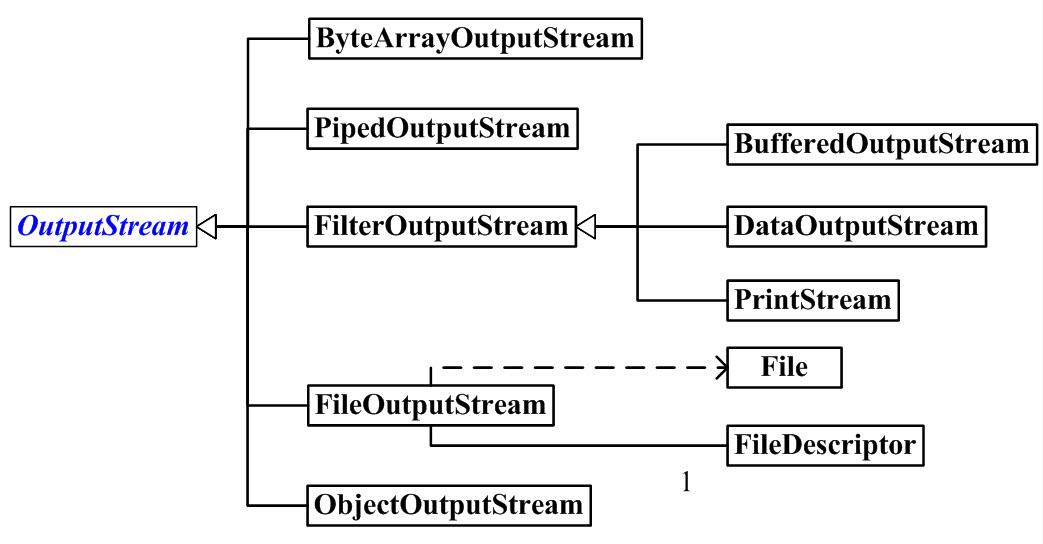
字节输出流框架图

2.1OutputStream

OutputStream是字节输出流的基类。

2.2ByteArrayOutputStream

构造函数

  • ByteArrayOutputStream()
  • ByteArrayOutputStream\(int size\)

1.3FileOutputStream

    private static void fileOutputStreamTest() {
        FileInputStream fis = null;
        FileOutputStream fos = null;
        try {
            fis = new FileInputStream("/Users/malinkang/Downloads/test.md");
            fos = new FileOutputStream("/Users/malinkang/Downloads/test2.md");
            byte[] buf = new byte[1024];
            int hasRead = 0;
            while ((hasRead = fis.read(buf)) > 0) {
                fos.write(buf, 0, hasRead);
            }
        } catch (IOException e) {
            e.printStackTrace();
        } finally {
            try {
                fis.close();
                fos.close();
            } catch (IOException e) {
                e.printStackTrace();
            }
        }
    }

1.4BufferedOutputStream

3.File

评论